Searching and Finding with Mac OS X
This page deals with the perennial problem of finding things on your computer, and in particular on a Mac running OS X. There is no Google desktop search for the Mac, but if you have OS X 10.4 (Tiger), then there is Spotlight. However, what about people who either don't have Tiger or (a common phenomenon) don't like Spotlight? The answer is: searching has always been one of the strong points of UNIX, so there is a lot of search functionality already there, hidden in the depths of the Darwin system.
Spotlight
Starting point
It seems the main problem with Spotlight is that making everything searchable doesn't imply that everything will be findable. The list of retrieved files in a Spotlight search is often too exhaustive to be directly usable. It is important, therefore, to know how to restrict such searches. This is discussed on Apple's Spotlight tips page. I'll collect some of my own bits of information below.
Spotlight insight
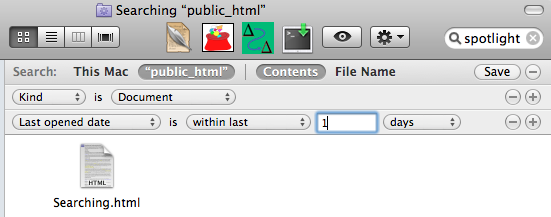 Several years into the life of Spotlight, the iteration found in Mac OS X Snow Leopard is meanwhile quite mature and can be customized from within the Finder, as the screen shot shows.
The Spotlight tips page mentioned above provides more insight into Spotlight's inner workings. It's all about collecting metadata in a central store. But as will be discussed below, this is nothing completely new to UNIX (see the locate command, but also the various help systems such as apropos). So it's no wonder that Spotlight's functionality turns out to be accessible from the Darwin command line as well. This is an advantage that far outweighs its drawbacks, because it shows Apple is really trying to take the needs of the UNIX-level user seriously.
Spotlight allows you to customize your searches to a certain extent from within the Spotlight search box  . For example, ending a search phrase with
 kind: pdf will throw out all non-pdf items. To go further, the Terminal is more useful. The main Spotlight terminal command is mdfind.
The Terminal lets you get the most out of Spotlight because it makes "post-processing" easier.
Although the advanced options of the GUI search box also let me do things like kind: lyx (because I have installed a Spotlight importer for LyX), this doesn't work for arbitrary file types. On the command line, I could get all the LyX files containing the word Bratwurst by typing
mdfind Bratwurst | grep ".lyx"
Similarly, I could find all the non-PDF files containing this search term
mdfind Bratwurst | grep -v ".pdf"
Here is something you can do with Spotlight that you can't do so easily with the old Finder (Sherlock): Let's say you remember you once wrote a C program that had to be linked with the accelerate framework. You don't recall the name of the program, but would like to find it so you can see how you did the linking. But you're at home at your little Panther laptop away from the big number-crunching Mac at work where the programs are (OK, I don't have a Panther laptop anymore — it's just an example). So log into that machine by ssh. If all your programs are in the directory "prgs", you can now type mdfind -onlyin progs accelerate, and your problem is solved in the blink of an eye. The man page for mdfind gives more information. Some features are not in the man page. To discover them, just type mdfind without arguments.
In order to achieve the same thing with regular UNIX command tools, one has to think harder and wait longer. Nevertheless, I'll go into some possible non-Spotlight approaches in what follows. In principle, one could use the command-line Spotlight tools to relieve small machines of the Spotlight activity alltogether by backing such machines up onto a large computer where Spotlight then indexes everything. The small computers could pretty much disable Spotlight for those directories that are backed up. Then if a difficult search needs to be performed, it could be done remotely on the backup server.
Spotlight importers
There are some files that aren't searched by Spotlight, but that should be. One of these is Mathematica Notebooks. There are importers available for many file types now; check the page at Apple's Spotlight Mac OSX web site.
EasyFind
If you want an alternative to Spotlight, have a look at EasyFind. Its methodology does not rely on indexing, as does Spotlight's.
UNIX find and grep
This is the command-line way. Combined with some scripting, these commands can be very powerful. They also don't rely on indexing, so they actually do what you expect a search to do: look at the data that's really on your disk. You may have encountered the pitfalls of indexing with internet search engines like Google: sometimes the page summary you get in the search results doesn't correspond to the actual contents of the page because the index is not in sync with the web page that is in fact online. For more information on find and grep, invoke the info command from the command line or in emacs and examine the section Basics.
Locate: Spotlight "light"?
Command line
UNIX (and Darwin) has a command called locate which, like Spotlight, makes use of an index database to find files. However, this database is not updated continuously. Instead, one usually sets this up to be updated periodically. The initial setup of the database is done by sudo launchctl load -w /System/Library/LaunchDaemons/com.apple.locate.plist (to administrate updates, see updatedb). So this is a compromise solution between the Spotlight way and the EasyFind Way. It is mostly useful for people who do not have Spotlight, i.e. those not running Tiger, or those who disabled Spotlight completely because they don't want a process interfering whenever something is saved on disk.
To compare locate and mdfind, try to find a file with both approaches (here I choose a PDF file that exists on any computer with a TeX installation):
-
mdfind "kMDItemDisplayName == pdftex-a.pdf" locate pdftex-a.pdf
mdfind wins by a factor of five. Both search methods also permit wildcard characters. However, mdfind can do more complex searches as mentioned above.
If you're interested in trying this approach, it is advisable to not use Apple's version of the shell command, because its indexing function does not handle the prunepaths option correctly (which allows to exclude folders from indexing). Instead, use the version provided by fink. You do this with fink install findutils. The findutils web page provides some online documentation. This package also installs a different version of find. With the fink installation, the automatic database update job is also set up for you (using crontab - an entry is created in /sw/etc/cron.daily/findutils), without any additional work on your part. The update job just runs quietly in the background at the predefined intervals, and all you will then notice is a few minutes of increased disk activity (depending on the size of your file system). The difference to Spotlight is that locate by itself does not search inside files; on the other hand, it leaves the file system alone for most of the day. Of course this way the database typically does not contain changes made in the last few hours, but for a reasonably organized user the need for searching should arise mostly with files older than that.
Jens Nöckel Last modified: Fri May 6 15:41:45 PDT 2011